Before you start:
Connect the charging dock to a power source and place your Ring on the dock. A blinking green light means your Ring is ready to pair.
Ensure Bluetooth is enabled on your phone and keep your Ring close by.
Provide Necessary Permission
When you select fitze Ring as your step source, a pop-up requesting access to Location will appear. Tap on Allow.
Another permission required is to “Allow fitze to find, connect to and determine the relative position of nearby devices.” Tap on Allow.
Connecting with fitze Ring
- Select fitze Ring as your step source.
- Tap on your Ring name to begin pairing. If multiple Rings appear, select the one matching your Ring box serial number.
Note: If your Ring is already paired with another device, disconnect it first to continue.
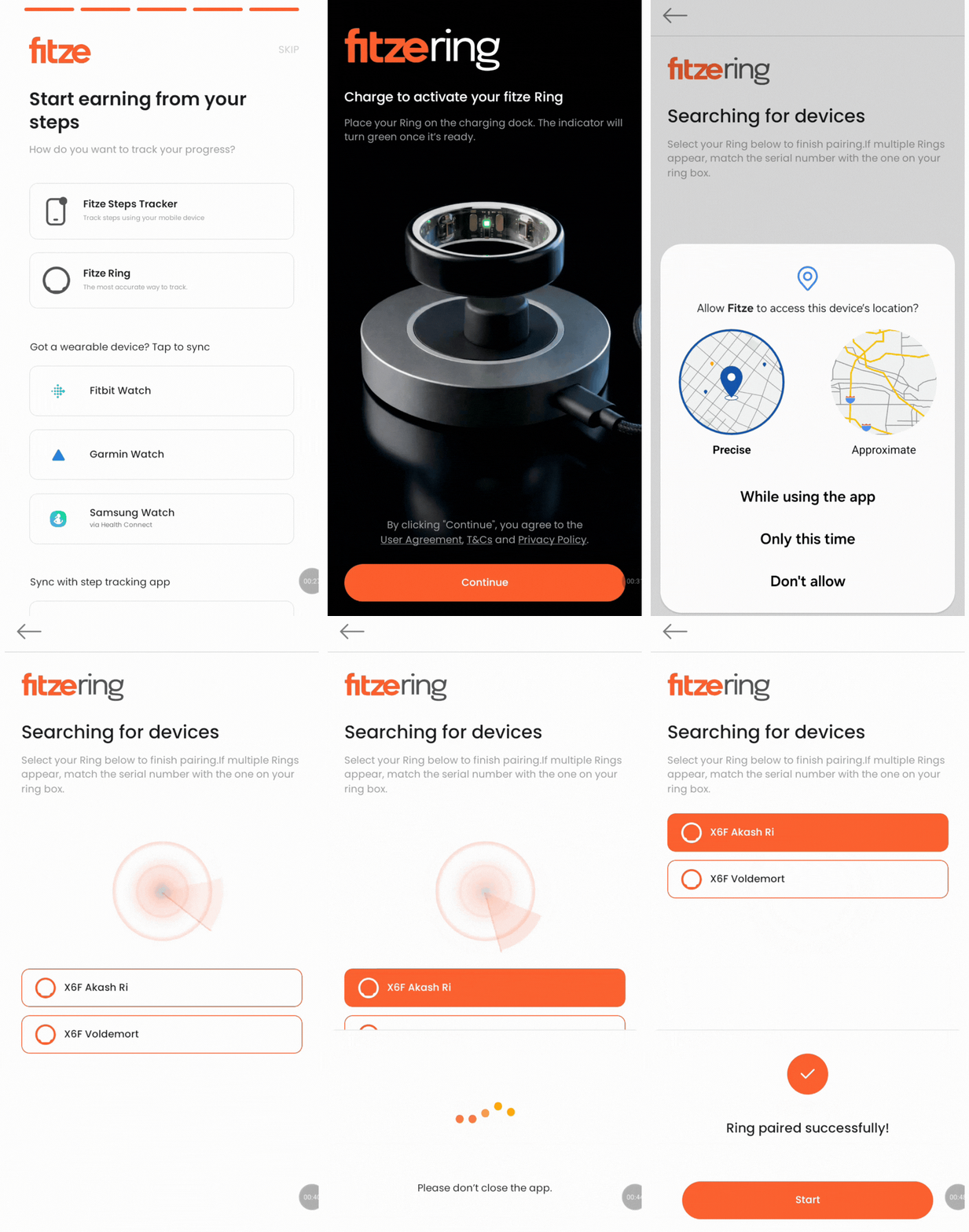
Paired successfully!
Once done, your Ring will pair successfully and be ready to use.Once done, your Ring will pair successfully and be ready to use.
Facing issues tap on “Support” at the top right of this screen.